

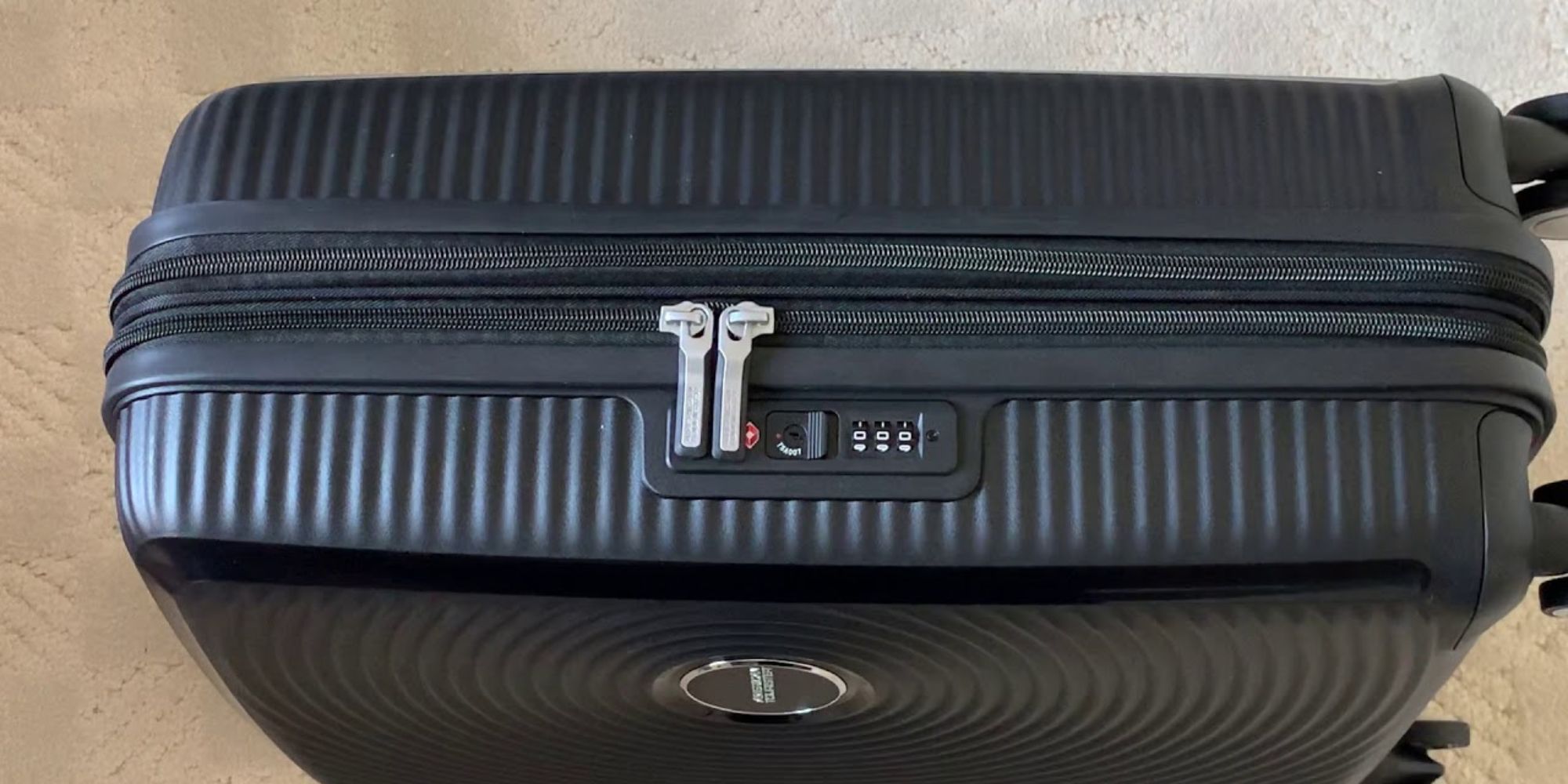
To set a lock on American Tourister luggage, first identify whether you have a traditional combination lock or a TSA-approved lock, then follow the specific reset method for that type. The exact steps depend on your lock’s design: some use a reset button or pinhole, while others require you to push and hold the opening button toward the dials. Gather your luggage, the lock instructions, and a pen or small tool before you begin, as having everything ready makes the process smoother.
Step 1: Gather the necessary materials
Before you begin setting the lock on your American Tourister luggage, gather everything you'll need. Having materials ready makes the process smoother. Here's what you'll need:
Related travel guides: How To Reset 3 Digit Lock On American Tourister Luggage and How To Unlock An American Tourister Escort Train Case Luggage Cosmetic Case.
- American Tourister luggage: Ensure your luggage is within reach. Different models may have slight variations in the lock setting process, so have the correct luggage on hand.
- Lock instructions: Most American Tourister luggage comes with lock instructions. Check for included paperwork or manuals that provide specific guidance on setting the lock.
- An appropriate lock: Depending on your model, you may have a traditional combination lock or a TSA-approved lock. Refer to the lock instructions to determine your lock type.
- A pen or small tool: You may need a pen, paperclip, or pin to reset the combination. Some locks have a reset button or pinhole that requires a tool; others require you to push and hold the opening button toward the dials instead. Knowing which method your lock uses is essential—checking before you start can prevent confusion, much like knowing how much can your suitcase weigh on Southwest before heading to the airport.
Ensure you have all materials within reach before proceeding. Once gathered, you're ready to move on to identifying your lock type and setting the combination.
Step 2: Identify the lock type
Before you can set the lock on your American Tourister luggage, it's important to identify the type of lock you have. American Tourister offers different lock options, and the process of setting each lock type may vary slightly. Here are the two common types of locks you might encounter:
- Traditional combination lock: This type of lock requires you to set a unique combination of numbers to secure your luggage. The lock has a dial or a set of rotating wheels with numbers on them. To open the lock, you must align the numbers of the combination correctly.
- TSA-approved combination lock: If you have a TSA-approved lock, it means that the lock has a special feature that allows authorized TSA personnel to open and inspect your luggage without damaging the lock. These locks often have a red diamond-shaped indicator on them to signify that they are TSA-approved.
Take a close look at your American Tourister luggage and locate the lock. If there is a small lock icon or a lock mechanism with a dial or rotating wheels, you likely have a traditional combination lock. If you see a red diamond-shaped indicator or a label indicating that the lock is TSA-approved, then it is a TSA-approved lock.
Identifying the lock type is crucial because it determines the specific steps you need to follow to set the lock combination. Once you have determined the lock type on your American Tourister luggage, you are ready to move on to the next step: setting the lock combination.
Step 3: Set the lock combination
Now that you have identified the lock type on your American Tourister luggage, it's time to set the lock combination. Follow the instructions below based on the type of lock you have:
For a traditional combination lock:
- If your lock has a small reset button or pinhole, ensure the lock is in the open position (you may need to enter a default combination, such as 0-0-0, to unlock it).
- Locate the small reset button or pinhole on the bottom or side of the lock. Use a pen or a small tool to press and hold the reset button or insert it into the pinhole.
- While holding the reset button or tool in place, choose your desired combination by rotating the wheels to your preferred numbers. Make sure to remember the combination or write it down in a safe place.
- Release the reset button or remove the tool from the pinhole.
- Test the lock by scrambling the numbers and then aligning them to your chosen combination. The lock should click or snap into place, indicating that it is locked.
Note: If your lock lacks a pinhole or reset button, you can still change the code by pushing and holding the opening button (the one you press to open the lock) toward the dials while setting the new numbers—this is a common alternative on models without a reset pinhole.
For a TSA-approved combination lock:
- If your lock has a small reset button or pinhole, set the lock in the open position using the default combination if necessary. Find the small reset button or pinhole on the bottom or side of the lock. Use a pen or a small tool to press and hold the reset button or insert it into the pinhole.
- While holding the reset button or tool, select your desired combination by rotating the wheels to the desired numbers.
- Release the reset button or remove the tool from the pinhole.
- Test the lock by scrambling the numbers and then aligning them to your chosen combination. The lock should click or snap into place, indicating that it is locked.
If your lock does not have a pinhole, use the alternate method: push and hold the opening button toward the dials while setting your combination. Remember to always follow the specific instructions provided with your American Tourister luggage, as lock setting procedures may vary slightly. Once you have successfully set the lock combination, it's time to move on to the next step: testing the lock.
Step 4: Test the lock
After setting the lock combination on your American Tourister luggage, it's important to test the lock to ensure that it is working properly. Testing the lock will give you peace of mind, knowing that your belongings are securely protected. Follow these steps to test the lock:
- Scramble the numbers on the lock dial or wheels to mix up the combination.
- Carefully align the numbers to your chosen lock combination.
- Listen for a click or feel for a snap as the lock mechanism engages. This indicates that the lock is locked.
- Try to pull the zippers or handles of your American Tourister luggage to make sure they are securely fastened and cannot be opened without entering the correct combination.
- If the lock opens easily or the zippers can be opened without entering the combination, repeat the steps to set the lock combination. Double-check that you follow the instructions correctly and ensure that the lock is properly secured.
Testing the lock is crucial as it confirms that the combination is correctly set, ensuring that your luggage is secured during your travels. It's always better to be safe than sorry, so take the time to test the lock before using your American Tourister luggage on your next journey.
Once you are satisfied that the lock is working correctly and your belongings are secure, you are ready to move on to the final step: securing your luggage for travel.
Step 5: Secure the luggage
Now that you have successfully set and tested the lock on your American Tourister luggage, it's time to secure your luggage for travel. Following these steps will ensure that your belongings are well-protected:
- Ensure that all of your belongings are properly packed and organized within your suitcase or travel bag.
- Carefully close the main compartment and any additional pockets or compartments on your luggage.
- Align the zippers or closures of your American Tourister luggage, making sure they are fully engaged.
- Double-check that the lock on your luggage is in the locked position and that the correct combination is set.
- If your American Tourister luggage has any additional locking features, such as straps or buckles, secure them as well for added security.
- Before leaving your luggage unattended, store it in a secure location, such as a locked hotel room or a designated luggage storage area at airports or train stations.
By properly securing your American Tourister luggage, you can have peace of mind while traveling, knowing that your belongings are safe and protected. Remember to keep your lock combination in a secure place, preferably not with the luggage itself, to avoid any unnecessary inconvenience.
It's also a good practice to label your luggage with your contact information, in case it gets misplaced or lost during your journey. This can make it easier for airlines or other authorities to contact you if your luggage is found.
With your American Tourister luggage locked and secured, you can now travel with confidence, knowing that your belongings are protected. Have a safe and enjoyable journey!
Conclusion
Setting a lock on your American Tourister luggage is an essential step in ensuring the security of your belongings while traveling. Whether you have a traditional combination lock or a modern TSA-approved lock, following the step-by-step process outlined in this article will help you set the lock with ease.
Remember to store your combination in a safe place, separate from your luggage, and always refer to your specific model’s instructions for any variations.
