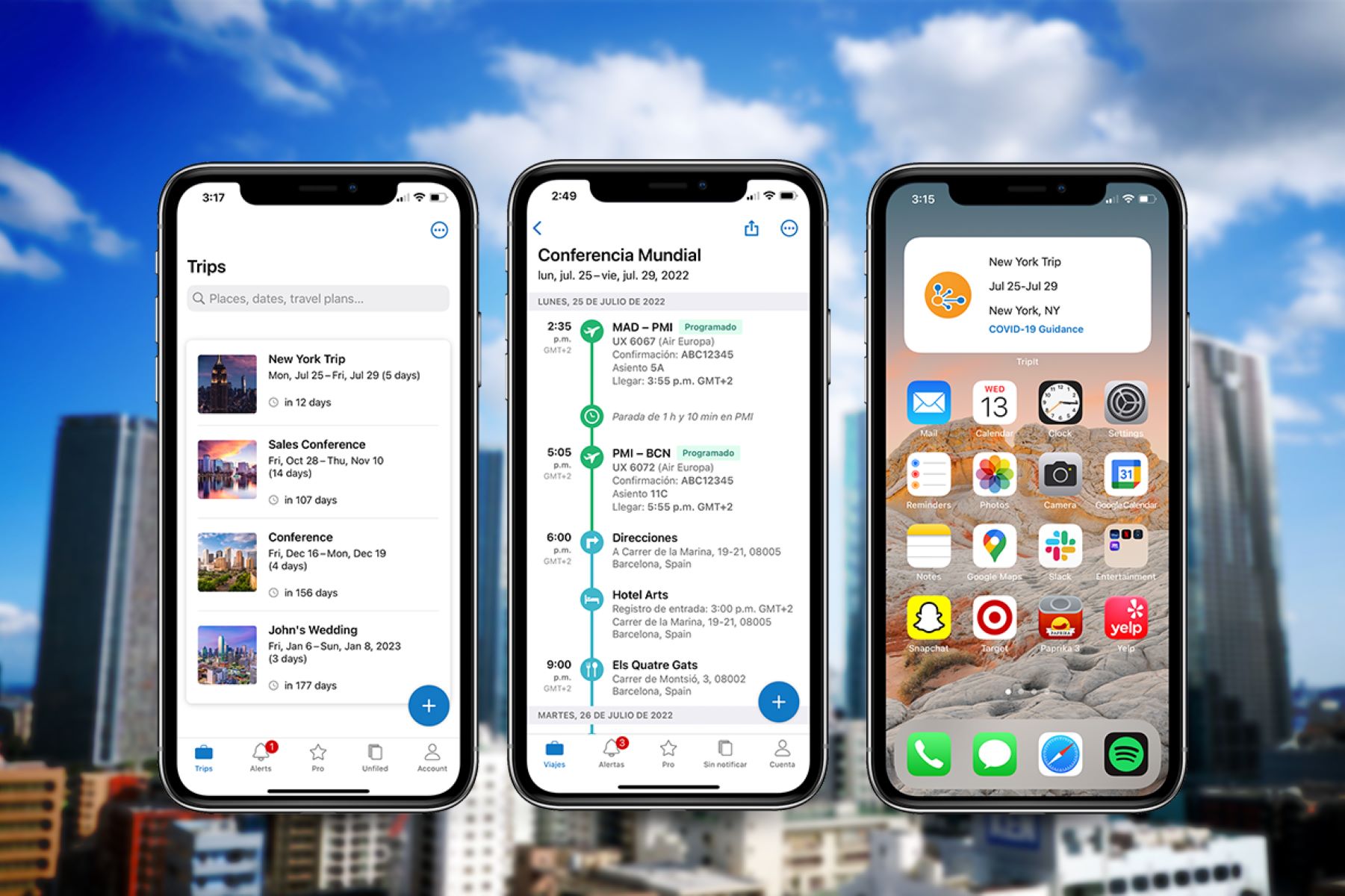
The best travel app is TripIt, a comprehensive travel organization app that helps travelers effortlessly manage their trips from start to finish. The catch is that to unlock its full potential, you must be willing to forward your travel confirmation emails to a designated TripIt email address, where the app then automatically extracts relevant information such as flight details, hotel bookings, car rental reservations, and even restaurant reservations, organizing them into a neat and structured itinerary.
What is TripIt?
It acts as a single hub for all your travel information, eliminating the need for scattered emails, booking confirmations, and paper documents. At its core, TripIt aims to simplify the travel experience by providing a centralized platform to store and access all your essential travel details.
Once you create a TripIt account, you can forward your travel confirmation emails to a designated TripIt email address. This means no more searching through your inbox or digging through folders to find important travel information.
TripIt provides weather forecasts based on your trip details. It also provides real-time updates on flight delays, gate changes, and other important notifications, ensuring that you're always informed about any changes to your plans. The app syncs with your calendar, allowing you to easily view your trip itinerary alongside your other appointments and commitments.
Furthermore, TripIt allows you to easily share your travel plans with friends, family, or colleagues, making it convenient for them to know your schedule and stay connected while you're on the go. You can also collaborate with others, such as planning a group trip or sharing itineraries with fellow travelers.
One of the most impressive features of TripIt is its ability to access your travel information offline. This is particularly useful when you're traveling to remote locations or when you don't have access to a stable internet connection. With TripIt, you can access your itineraries, maps, and other important details even when you're offline.
TripIt is a travel organization tool that simplifies the entire travel process, from organizing to staying informed and connected. With its intuitive interface and powerful features, it's the go-to app for millions of travelers worldwide.
Key Features of TripIt
TripIt offers a range of features that make it a standout travel organization app. Here are some of its key features:
- Centralized Itinerary: TripIt acts as a centralized hub for all your travel information, allowing you to easily view and manage your itineraries in one place. No more hunting for confirmation emails or scrolling through endless folders - TripIt organizes everything for you.
- Automatic Trip Organization: Forward your travel confirmation emails to TripIt, and it automatically extracts relevant details, such as flight times, hotel bookings, car rentals, and restaurant reservations. It then creates a comprehensive itinerary for each trip, saving you time and effort.
- Real-Time Flight Updates: Stay up to date with your flight status, gate changes, and delays with TripIt's real-time flight updates. It sends you notifications and alerts, allowing you to adjust your plans accordingly and minimize any disruptions.
- Calendar Integration: Sync TripIt with your calendar, so your trip itineraries seamlessly integrate with your existing schedule. Have a clear overview of your travel plans alongside your other commitments, making it easy to manage your time effectively.
- Offline Access: Access your travel information even when you're offline. TripIt allows you to download your itineraries, maps, and other essential details, ensuring that you have access to important information even in areas with limited or no internet connection.
- Sharing and Collaboration: Easily share your itineraries with friends, family, or colleagues. TripIt allows you to collaborate with others, making it perfect for planning group trips or keeping everyone updated on your travel plans.
- Expense Tracking: Keep track of your travel expenses with TripIt's expense tracking feature. Simply forward your expense-related emails, such as hotel bills or car rental receipts, and TripIt will add them to your trip details, providing an easy way to monitor your spending.
- Travel Recommendations: TripIt provides weather forecasts based on your trip details.
- Integration with Travel Apps: Seamlessly connect your TripIt account with other travel apps and services, such as airline and hotel loyalty programs, car rental companies, and navigation apps, for a seamless and integrated travel experience. For example, you can modify reservation on Expedia or add your known traveler number to an existing booking through connected services.
These are just a few of the many features that TripIt offers. With its comprehensive set of tools, TripIt ensures that you have all the information you need to make your travels stress-free and enjoyable.
How to Get Started with TripIt
Getting started with TripIt is quick and easy. Follow these steps to begin organizing your travel plans:
- Create an Account: Download the TripIt app on your smartphone or access the TripIt website on your computer. Sign up for a free account by providing your email address and creating a password.
- Forward Confirmation Emails: Once you have your TripIt account, start forwarding your travel confirmation emails to the designated TripIt email address. This can include flight bookings, hotel reservations, car rentals, and other travel-related emails. For example, you can forward an Expedia confirmation to the TripIt email to locate my reservation on Expedia within the app.
- Watch as TripIt works its magic: Once TripIt receives your forwarded emails, it automatically extracts the relevant details and creates a well-organized itinerary for your trip. You can view all your travel plans in one place, including flight times, hotel information, and more.
- Customize and Add Details: TripIt allows you to customize your itineraries further. You can add additional activities, notes, or reminders to your trip, ensuring that all your travel details are in one convenient location. You can also add your Delta Skymiles number to an existing reservation through the app.
- Sync with Your Calendar: To keep your travel plans seamlessly integrated with your daily schedule, sync your TripIt account with your calendar. This way, you can easily view your travel itineraries alongside your other appointments and commitments.
- Download the Mobile App: To have your travel information readily available on the go, download the TripIt mobile app. This way, you can access your itineraries, flight updates, and other travel details anytime, anywhere.
- Share and Collaborate: TripIt allows you to share your travel plans with others easily. You can invite friends, family, or colleagues to view your itineraries or collaborate on trip planning. Sharing updates is as simple as sending a link.
- Enjoy Your Organized Travel Experience: With TripIt, you can relax and feel confident that all your travel plans are in one place. No more searching through multiple emails or worrying about missing important details. TripIt takes care of it all, so you can focus on enjoying your trip.
Whether you're a seasoned traveler or new to the adventures of exploring the world, TripIt makes the travel organization process seamless and hassle-free. Start using TripIt today and discover a whole new level of travel convenience.
Creating and Managing Trips
With TripIt, creating and managing trips is straightforward. Here's how to use this feature:
- Create New Trips: To begin, click or tap the "Create New Trip" button within the TripIt app or website. Enter the destination, dates, and other relevant details to generate a new itinerary.
- Add Trip Details: Once your trip is created, add specific details such as flight bookings, hotel reservations, car rentals, and restaurant reservations. TripIt allows you to forward your confirmation emails to automatically populate the relevant information into your itinerary. You can also forward a confirmation from Expedia to locate my reservation on Expedia.
- Edit and Customize Itineraries: TripIt gives you the flexibility to edit and customize your itineraries. You can add additional activities, notes, or reminders, and rearrange the order of itinerary items.
- Organize Multiple Trips: If you have multiple trips planned, TripIt lets you manage them all within a single interface. You can view all your trips at a glance, switch between them seamlessly, and keep everything organized.
- Stay Updated with Changes: Flight delays, gate changes, and other disruptions can be a major headache when traveling. TripIt provides real-time updates and notifications. You'll be instantly alerted about any changes to your travel plans, allowing you to adjust accordingly.
- Sync with Your Devices: TripIt syncs your travel itineraries across all your devices. Whether using a smartphone, tablet, or computer, you can access your trip details from anywhere, at any time.
- Collaborate with Others: TripIt makes it easy to collaborate on trips. You can share itineraries with family, friends, or colleagues, allowing them to stay informed. This is useful for group trips or business travel where coordination is key.
- Archive Past Trips: Once your trip is completed, you can archive it within the TripIt app or website. This keeps current trips organized and past trips accessible for future reference.
Creating and managing trips with TripIt saves you time and effort while keeping your travel plans well-organized and accessible. Stay on top of your itineraries, make adjustments on the go, and have a stress-free travel experience with TripIt.
Organizing Travel Information
One of the primary benefits of using TripIt is its ability to help you efficiently organize all your travel information. Here's how TripIt can assist you in keeping your travel details in order:
- Centralized Itinerary: TripIt acts as your centralized hub for all your travel-related information. It automatically gathers and consolidates details from your confirmation emails, including flight bookings, hotel reservations, car rentals, and more, into a single itinerary.
- Structured Itinerary View: TripIt presents your travel itinerary in a clear and structured format, making it easy to view and understand. You can see the chronological order of your trip, with each itinerary item neatly organized and labeled for quick reference.
- Easy Accessibility: With TripIt, you can access your travel information from anywhere, at any time. The mobile app allows you to have your itineraries readily available on your smartphone, while the website gives you access via your computer or tablet.
- Offline Access: TripIt recognizes that internet connectivity may be limited or absent during your travels. That's why it provides the option to download your itineraries for offline access. You can view your trip details, including flight information, hotel addresses, and reservation numbers, even without an internet connection.
- Adding Custom Details: In addition to the automatically populated information, TripIt allows you to add custom details to your itineraries. This can include activities, notes, and reminders that are specific to your trip, enhancing the level of personalization and organization.
- Expenses Tracking: TripIt helps you keep track of your travel expenses by allowing you to add expense-related emails, such as hotel bills or rental receipts, to your trip details. This feature simplifies expense tracking and makes it easier to manage your travel budget.
- Maps and Directions: TripIt integrates maps and directions into your itineraries, making it simple to navigate your way around new destinations. You can easily view directions from your current location to your hotel, airport, or other points of interest.
- Document Storage: TripIt allows you to attach documents, such as passport copies or travel insurance details, to your itineraries. This feature ensures that all your important travel documents are securely stored and easily accessible when needed. For travelers who need to scan a passport, you can upload the image directly to your trip for quick reference.
With its comprehensive organization features, TripIt eliminates the hassle of juggling multiple emails, papers, and applications. It keeps your travel information in one place, ensures easy accessibility, and allows you to focus on enjoying your journey without worrying about staying organized. It provides weather forecasts based on your trip details.
Sharing and Collaborating with Others
TripIt goes beyond just organizing your travel plans - it also makes it easy to share and collaborate with others. Here's how you can stay connected and synchronized with fellow travelers or those who need to be aware of your travel details:
- Share Itineraries: With TripIt, you can share your travel itineraries with friends, family, or colleagues. Simply invite them via email, and they will receive a link to view your trip details. This is especially useful when planning group trips or when you need to keep loved ones informed about your travels.
- Collaborate on Plans: TripIt allows for seamless collaboration on trip planning. You can invite others to contribute to your trip itinerary, allowing everyone involved to make suggestions, add activities, or make changes. This feature is particularly handy for coordinating travel arrangements with a group or colleagues.
- Real-Time Updates: When you share your TripIt itinerary with others, they receive real-time updates on any changes to your travel plans. This ensures that everyone stays informed about flight delays, gate changes, or any other updates that may affect the itinerary.
- Message and Chat: TripIt includes a messaging feature that enables communication between collaborators within the app. This allows you to share important updates, discuss travel details, or ask questions related to the trip, all within the TripIt platform.
- Email Notifications: For those who prefer to receive updates via email, TripIt provides email notifications for itinerary changes and updates. The email includes a summary of the changes made, making it easy for collaborators to stay informed even if they are not actively using the TripIt app.
- Customize Sharing Permissions: TripIt allows you to set permissions for each collaborator, giving you control over what they can view and edit in your itinerary. You can choose to grant access and editing rights to specific individuals or limit their access to view-only mode.
- Linked Accounts: If you frequently travel with the same people, you can link your TripIt accounts. This feature simplifies the process of sharing itineraries, as collaborator details are automatically populated, eliminating the need for multiple invites.
- Shareable Travel Plans: TripIt offers a feature called "Shareable Travel Plans", which allows you to create a public link for your itinerary. This is particularly useful when sharing your travel plans with people who are not TripIt users - they can simply access the link to view your itinerary without requiring a TripIt account.
Sharing and collaborating with others on TripIt not only enhances coordination and communication but also ensures that everyone involved is on the same page. Whether you're planning a family vacation or a business trip, TripIt makes it easy to stay connected and work together to create memorable and well-organized travel experiences.
Accessing Trip Information Offline
TripIt understands that staying connected at all times can be challenging, especially when traveling to remote areas or facing unreliable internet access. That's why it offers the ability to access your trip information offline. Here's how TripIt ensures that you have all your essential travel details regardless of your internet connection:
- Download Itineraries: Before your trip, TripIt allows you to download your itineraries directly to your mobile device. This means that even if you don't have an internet connection, you can access your trip details including flight information, hotel reservations, and car rental details.
- Maps and Directions: With TripIt's offline access feature, you can also download maps and directions for your trip. This is particularly useful when navigating unfamiliar cities or areas where internet connectivity may be limited. You can view maps, find directions, and explore your destination without needing an internet connection.
- No Internet? No Problem: When you're offline, TripIt still allows you to view all the information contained within your itineraries. This includes important details such as flight times, gate numbers, hotel addresses, and reservation numbers. You won't have to worry about missing a crucial piece of information just because you don't have internet access.
- Stay on Top of Changes: Even when you're offline, TripIt keeps you informed about any changes to your travel plans. It sends push notifications to your device, alerting you of flight delays, gate changes, or any other modifications to your itinerary. This ensures that you stay updated and can adjust your plans accordingly.
- Accessible Anytime, Anywhere: With your downloaded itineraries, maps, and notifications, TripIt allows you to access your travel information anytime, anywhere, even without an internet connection. Whether you're on a flight, in a remote location, or simply want to conserve data, you can rely on TripIt to provide you with the information you need.
Accessing trip information offline with TripIt gives you the peace of mind knowing that you're prepared and equipped with all the essential details for your journey. Whether you're exploring off-the-grid destinations or simply want to stay connected in areas with limited connectivity, TripIt ensures that you have offline access to your travel plans whenever you need them.
TripIt Pro: Premium Features
In addition to its free version, TripIt also offers a premium subscription called TripIt Pro. This upgraded membership provides a range of advanced features to enhance your travel experience. Here are the standout features of TripIt Pro:
- Real-Time Flight Alerts: TripIt Pro provides real-time flight alerts, keeping you updated on any changes to your flight status, including delays, gate changes, and cancellations. This feature ensures that you're always informed and able to adjust your plans accordingly.
- Seat Tracker: With TripIt Pro, you can take advantage of the seat tracker feature. This functionality allows you to receive alerts about better seat options, including aisle seats, window seats, or even upgrades, giving you the opportunity to choose the most comfortable and convenient seating arrangements.
- Alternate Flight Options: In the event of a flight disruption or cancellation, TripIt Pro presents you with alternative flight options, helping you find and book an alternative route quickly and efficiently. This feature saves you time and eliminates the stress of having to search for alternate flights manually.
- Security Wait Times: TripIt Pro provides estimated security wait times for airports worldwide, helping you plan your time better and arrive at the airport with peace of mind. This feature reduces the uncertainty of how long security procedures may take and enables you to be better prepared for your journey.
- Point Tracker: The point tracker feature in TripIt Pro allows you to conveniently keep tabs on your frequent flyer and loyalty program points. You can track your rewards and monitor your progress towards your next tier or redeemable incentive, ensuring that you make the most of your travel perks.
- Automatic Trip Sharing: With TripIt Pro, your travel itineraries can be automatically shared with select contacts. This eliminates the need to manually share trip details, ensuring that your loved ones or colleagues are always informed about your travel plans without any extra effort on your part.
- Enhanced Customer Support: As a TripIt Pro subscriber, you receive priority customer support. If you encounter any issues or have questions about your travel plans, you can access dedicated customer support services and receive prompt assistance.
- Ad-Free Experience: TripIt Pro offers an ad-free experience within the app, allowing you to focus purely on your travel plans without any distractions.
TripIt Pro elevates your travel experience by offering a suite of advanced features that cater to frequent travelers or those who desire additional convenience and peace of mind. With real-time alerts, seat tracking, alternative flight options, and more, TripIt Pro is designed to provide an upgraded level of service and support throughout your journeys. TripIt provides weather forecasts based on your trip details, though it organizes trips you have already booked rather than functioning as a full trip-planning tool for researching an itinerary from scratch.
TripIt vs Other Travel Apps
When it comes to travel apps, there are several options available in the market. Let's compare TripIt to other popular travel apps and see why TripIt stands out:
Organization and Integration:
- TripIt excels at organizing and consolidating all your travel information into one cohesive itinerary. It automatically extracts details from confirmation emails and creates a structured itinerary view, ensuring that you have quick access to your flight, hotel, and other travel details. Some other travel apps may offer similar features, but TripIt's seamless integration and intuitive interface make it stand out.
Offline Access:
- TripIt's offline access feature sets it apart from many other travel apps. By allowing you to download your itineraries, maps, and other important details, TripIt ensures that you have access to your travel information even when you don't have an internet connection. This is particularly invaluable when traveling to remote areas or when you face limited connectivity.
Real-Time Updates:
- TripIt provides real-time flight alerts, keeping you informed about any changes to your flight status, gate changes, or delays. While other travel apps may offer flight tracking features, TripIt's real-time updates are known for their accuracy and reliability.
Collaboration and Sharing:
- TripIt makes it easy to share your travel itineraries with others, allowing for seamless collaboration. You can invite friends, family, or colleagues to view and contribute to your trip plans. While some other travel apps offer similar sharing options, TripIt's user-friendly interface and customizable sharing permissions make it straightforward and convenient.
Premium Features:
- TripIt offers a premium subscription, TripIt Pro, which unlocks a range of advanced features. These include real-time flight alerts, seat tracking, alternate flight options, and enhanced customer support. While some other travel apps may have premium versions, TripIt Pro's unique features and dedicated support set it apart from the competition.
User Experience:
- TripIt's user-friendly interface and intuitive design make it easy for users to navigate and access their travel information. The app's attention to detail, such as providing clear visuals and organized itineraries, enhances the overall user experience. While other travel apps may have similar features, TripIt's focus on user experience ensures a seamless and enjoyable journey from start to finish.
While other travel apps may offer some similar features, TripIt distinguishes itself through its comprehensive organization, offline access, real-time updates, collaboration capabilities, premium features, and user experience. These factors collectively make TripIt the preferred choice for travelers looking for a reliable, all-in-one travel app. TripIt organizes trips you have already booked; it does not function as a full trip-planning tool for researching and building an itinerary from scratch.
Conclusion
It eliminates the stress of managing multiple emails, confirmations, and documents by providing a centralized hub for your itineraries, ensuring quick access to flight details, hotel reservations, car rentals, and more.
Offline access allows you to download itineraries and essential information, keeping you prepared even without internet connectivity. TripIt Pro adds real-time flight updates, seat tracking, and alternate flight options to help you navigate disruptions.
Collaboration features make it easy to share itineraries with family, friends, or colleagues on business trips, with customizable sharing permissions for straightforward coordination. If you need to locate my reservation on Expedia or modify reservation on Expedia, TripIt consolidates those confirmations automatically.
Compared to other travel apps, TripIt stands out for its integrated approach. TripIt Pro offers real-time updates, seat tracking, security wait times, and enhanced customer support. Whether you're a frequent traveler or on your first adventure, TripIt keeps you organized, informed, and connected throughout your journey.