

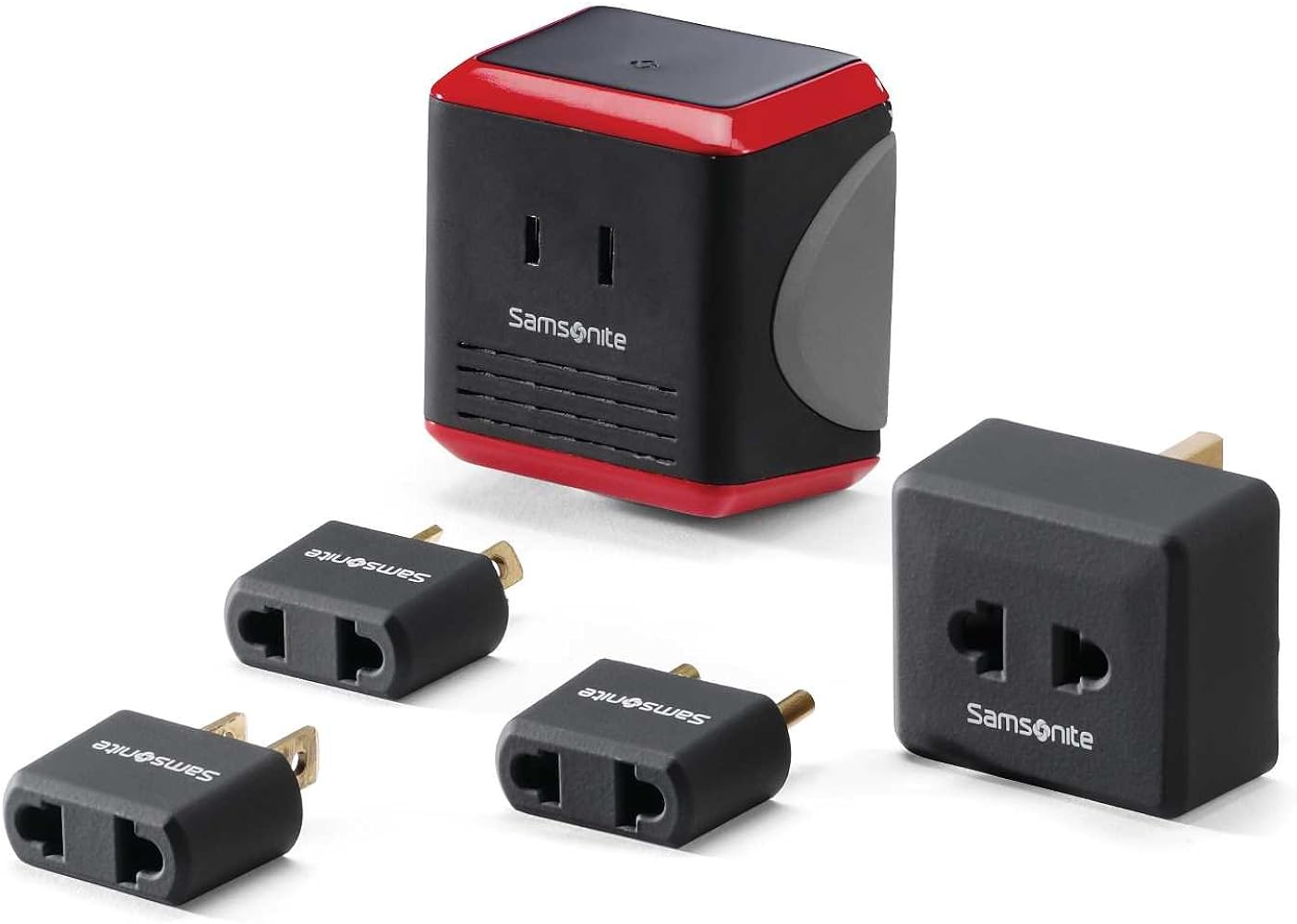
To use the Samsonite Universal Power Adapter, plug your device into the appropriate international plug type and connect it to the local power outlet. However, if your device is single-voltage, you must use a separate voltage converter with some adapter models to avoid damaging your electronics. The compact adapter supports multiple international plug types, includes a USB port for direct charging, and has built-in surge protection for safe use worldwide.
Overview of the Samsonite Universal Power Adapter
The Samsonite Universal Power Adapter is a compact and versatile device that allows you to charge your electronic devices while traveling internationally. It is specially designed to provide compatibility with a wide range of devices, making it a practical travel essential for tech-savvy globetrotters.
Equipped with multiple charging options, the Samsonite Universal Power Adapter supports multiple international plug types. This means that no matter where your adventures take you, you'll have the right plug to connect your devices to the local power outlets.
One of the standout features of the Samsonite Universal Power Adapter is its small and lightweight design. It easily fits into your pocket or travel bag, taking up minimal space and adding minimal weight to your luggage. This makes it an incredibly convenient accessory for those who prioritize traveling light.
In addition, the Samsonite Universal Power Adapter is equipped with built-in surge protection, ensuring the safety of your devices during the charging process. It safeguards against sudden voltage spikes that could potentially damage your electronics, giving you peace of mind while traveling in unfamiliar power environments.
The adapter also boasts a USB port, allowing you to charge your devices directly via a USB cable. This means you can charge your smartphones, tablets, and other USB-powered gadgets without the need for separate USB adapters, minimizing clutter and simplifying your charging setup.
Moreover, the Samsonite Universal Power Adapter is designed with universal compatibility in mind. It supports a wide range of voltage inputs, from 100V to 240V, making it suitable for use in various countries around the world. Whether you're in North America, Europe, Asia, or Australia, this adapter has you covered. For devices that are single-voltage, some models of the Samsonite Universal Power Adapter require using a separate converter for single-voltage appliances.
With its wide-ranging compatibility, compact design, and reliable safety features, the Samsonite Universal Power Adapter is undoubtedly a must-have travel accessory. It ensures that you stay connected, powered up, and worry-free throughout your journey, enabling you to capture memorable moments, stay connected with loved ones, and navigate unfamiliar destinations all with ease.
Step 1: Checking the Compatible Devices
Before using the Samsonite Universal Power Adapter, it's important to ensure that your electronic devices are compatible with the adapter's charging capabilities. This step will help you determine if the adapter can effectively charge your devices and prevent any potential damage.
The Samsonite Universal Power Adapter is designed to charge a wide range of devices, including smartphones, tablets, laptops, cameras, and more. However, it's crucial to verify the power requirements of each device you plan on charging with the adapter.
Start by checking the power input specifications of your devices. Look for the voltage and frequency requirements, which are usually indicated near the power input port or on the device's charger. The voltage requirement is typically in the range of 100V-240V, which is compatible with the universal voltage support of the Samsonite Universal Power Adapter. It supports multiple international plug types.
Next, ensure that your devices have a charging port that is compatible with the adapter's USB output. Most devices nowadays are equipped with a standard USB Type-A or USB Type-C port, which can be easily connected to the adapter using the appropriate charging cable.
If any of your devices have non-standard charging ports, such as proprietary connectors or older-style USB connectors, you may need to use additional adapters or cables to connect them to the Samsonite Universal Power Adapter. It's advisable to check the compatibility of these additional accessories before traveling to avoid any complications during your trip.
Set the voltage conversion (if applicable): Some models of the Samsonite Universal Power Adapter require attaching a converter for single-voltage appliances. Make sure to use the converter if your device is single-voltage to avoid damaging your devices. By checking the compatibility of your devices with the Samsonite Universal Power Adapter in advance, you can ensure that you have all the necessary cables and adapters, allowing for a smooth and hassle-free charging experience while traveling. Remember, it's always better to be prepared!
Step 2: Understanding the Adapter's Components
Before you start using the Samsonite Universal Power Adapter, it's important to familiarize yourself with its various components. Understanding the different parts of the adapter will help you use it efficiently and ensure proper functionality.
Here are the main components of the Samsonite Universal Power Adapter:
- Power Plug Prongs: The adapter features interchangeable power plug prongs that can be easily adjusted based on the region you're traveling to. It supports multiple international plug types. To switch between different plug types, simply press the release button on the adapter and slide out the desired plug.
- Universal Power Socket: The front panel of the adapter features a universal power socket where you can plug in your electronic devices. This socket accepts a wide range of device plugs, including standard US, EU, and UK plugs. This allows you to charge multiple devices simultaneously.
- USB Port: The adapter also comes with a built-in USB port, marked with a USB symbol. This port allows you to directly charge devices that support USB charging. Simply connect your device to the adapter using a USB charging cable, and it will start charging. The USB port provides a convenient option for charging smartphones, tablets, and other USB-powered gadgets.
- LED Indicator: The adapter is equipped with an LED indicator that indicates the charging status. When the adapter is plugged into a power outlet and working correctly, the LED will typically illuminate, indicating that it's ready for use. However, the exact behavior of the LED may vary depending on the model and brand of the adapter.
By understanding these key components, you'll be better equipped to utilize the Samsonite Universal Power Adapter effectively. Take some time to familiarize yourself with the adapter's design and functionality before you embark on your travels to ensure a seamless and hassle-free charging experience.
Step 3: Configuring the Adapter's Settings
Configuring the settings of the Samsonite Universal Power Adapter is crucial to ensure optimal charging performance and compatibility with the power outlets in different countries. Follow these steps to properly set up the adapter for your specific needs:
- Select the correct power plug: Start by determining the appropriate power plug type for the region you're traveling to. The Samsonite Universal Power Adapter supports multiple international plug types. Slide out the desired plug by pressing the release button and align it with the power outlet in that particular region.
- Check the voltage requirements of your devices and ensure that the adapter is set up correctly. Most modern devices can handle a wide range of voltages (e.g., 100V-240V), but older devices may have specific voltage requirements.
- Charge multiple devices simultaneously: The adapter's universal power socket enables you to charge multiple devices at once. Simply plug in the devices' power cords or use suitable adapters or cables if necessary. Remember to distribute the power evenly across the devices to prevent overloading the adapter.
- Optional: Use the USB port for charging: If you have devices that can be charged via USB, take advantage of the Samsonite Universal Power Adapter's built-in USB port. Connect your device to the adapter using a compatible USB charging cable. This feature is particularly useful for charging smartphones, tablets, and other devices with USB charging capabilities.
By correctly configuring the Samsonite Universal Power Adapter's settings, you ensure that it delivers the appropriate power output and charge compatibility for your electronic devices. Take the time to adjust the settings as needed, and always refer to the device's user manual for specific voltage requirements and compatibility guidelines to avoid any damage to your valuable electronics. If you're unsure about your device's voltage needs, check whether it's dual-voltage before traveling—this is especially important when you're trying to figure out how much can your suitcase weigh on Southwest, as you'll want to pack the right converter alongside your other gear.
Step 4: Connecting the Adapter to Your Device
Now that you have configured the settings of the Samsonite Universal Power Adapter, it's time to connect it to your electronic device. Follow these simple steps to ensure a secure and proper connection:
- Check the device's charging port: Identify the charging port on your device. It is usually located on the bottom or side of your device and may be labeled with a power symbol or the word "Charge."
- Select the appropriate charging cable: Depending on the device you are charging, select the correct charging cable. For example, if you are charging a smartphone or tablet, you will typically use a USB charging cable. If you are charging a laptop or camera, you may need a specialized charging cable.
- Connect the charging cable to the adapter: Plug one end of the charging cable into the USB port of the Samsonite Universal Power Adapter. Ensure that the connection is secure, and the cable is inserted fully into the port.
- Connect the charging cable to your device: Connect the other end of the charging cable to the charging port of your electronic device.
- Confirm the charging connection: Once the adapter and device are connected, check for any LED indicator lights on the device or listen for charging notification sounds. This will verify that the connection is successful and that the device is charging.
It's important to handle the adapter and the device with care during the connection process. Avoid applying excessive force or bending the charging cable, as this may lead to a faulty connection or damage both the device and the adapter.
Remember, the Samsonite Universal Power Adapter supports multiple international plug types. Some models require using a separate converter for single-voltage appliances—use the converter for those devices, and only the adapter plug for dual-voltage appliances. By following these steps to connect the adapter to your device, you can ensure a proper charging connection and keep your devices powered up throughout your journey.
Step 5: Charging Your Device
With the Samsonite Universal Power Adapter connected to your device, it's time to start charging. Follow these steps to ensure a successful and efficient charging process:
- Confirm the power source: Ensure that the Samsonite Universal Power Adapter is plugged into a working power outlet. Check that the power outlet is supplying electricity by testing it with another device or by using a voltage checker if available.
- Verify the charging status: Look for any charging indicators or notifications on your device. Most devices have a battery icon or indicator light that displays the charging status. It may show a lightning bolt symbol or a filling battery icon to indicate that charging is in progress.
- Be patient: Charging times may vary depending on the device and its battery capacity. Allow sufficient time for your device to charge fully before unplugging it. It's recommended to charge your device until the battery is at least 80% full, ensuring optimal battery life and performance.
- Check for overheating: During the charging process, periodically check your device for any signs of overheating. If your device becomes excessively hot to the touch, disconnect it from the charger immediately and allow it to cool down before resuming charging.
- Disconnect the device when fully charged: Once your device reaches a full charge, unplug it from the Samsonite Universal Power Adapter. This will prevent overcharging, which can potentially decrease the battery lifespan.
It's worth noting that the Samsonite Universal Power Adapter supports multiple international plug types, so you can use it in various countries without needing a separate plug. However, for devices that are single-voltage (not dual-voltage), you must attach the separate converter that comes with the kit—do not rely on the adapter plug alone for voltage conversion. Some models of the Samsonite Universal Power Adapter require using a separate converter for single-voltage appliances, while dual-voltage devices (like most laptops and phone chargers) only need the adapter plug.
Additionally, some devices may have specific charging requirements or features. For example, certain smartphones support fast charging and may require specific adapters or cables to take advantage of this feature. Always refer to your device's user manual or manufacturer's guidelines for optimal charging practices.
By following these steps, you can effectively charge your electronics using the Samsonite Universal Power Adapter. Enjoy the convenience of staying connected and powered up while exploring new destinations or conducting business on the go.
Step 6: Troubleshooting Common Issues
While using the Samsonite Universal Power Adapter, you may encounter some common issues. Here are a few troubleshooting tips to help you overcome them:
- No charging or slow charging: If your device is not charging or charging at a slow rate, first ensure that the adapter is securely connected to the power outlet. Check the USB cable for any damage or loose connections. Additionally, try using a different USB cable or charging port to eliminate the possibility of a faulty cable or port.
- Adapter not fitting properly: If the adapter plug doesn't fit snugly into the power outlet, double-check that you have selected the correct plug type for the region you're in. It supports multiple international plug types. If necessary, try adjusting the plug, ensuring that it is fully inserted into the power outlet. Note that some power outlets may be worn out or loose, making it difficult to ensure a secure fit.
- Overheating issues: If you notice that the Samsonite Universal Power Adapter is getting excessively hot during use, unplug it and allow it to cool down. Overheating can be caused by a high power load or a faulty adapter. If the issue persists, consider contacting Samsonite customer support or seeking a replacement adapter.
- Compatibility problems: If you are unable to charge a specific device, verify that the device's power requirements are within the range supported by the adapter. Some devices may have unique charging requirements or may not be compatible with the adapter's power output. In such cases, consult your device's user manual or contact the manufacturer for further assistance.
- Adapter not working at all: If the Samsonite Universal Power Adapter is not working at all, first ensure that the power outlet is supplying electricity by testing it with another device. If the outlet is functional, try using a different adapter plug if available. If none of these steps resolve the issue, it may indicate a problem with the adapter itself, and you should contact Samsonite customer support for further assistance.
Remember, troubleshooting common issues with the Samsonite Universal Power Adapter is often a matter of identifying the root cause and taking appropriate steps to address it. By following these troubleshooting tips, you can resolve most charging-related issues and ensure a smooth and uninterrupted charging experience during your travels.
Conclusion
The Samsonite Universal Power Adapter is a travel essential for staying connected and powered up while exploring the world. Its compact, versatile design and compatibility with various power outlets and devices make it a reliable companion for globetrotters.
This article covered the steps to use the adapter effectively: checking device compatibility, understanding the adapter's components, configuring its settings, and connecting it to your device. It supports multiple international plug types.
We also discussed troubleshooting tips for common issues, helping you resolve charging problems quickly and ensure uninterrupted use of your electronics during travels.
With this adapter, you can explore new destinations, capture memories, stay connected with loved ones, and remain productive on the go—without searching for compatible outlets or carrying multiple chargers. Whether on a business trip, family vacation, or solo adventure, pack the Samsonite Universal Power Adapter for convenient charging wherever your journey takes you.
Related travel guides: 12 Best Victoria'S Secret Cosmetic Bag for 2024.
