

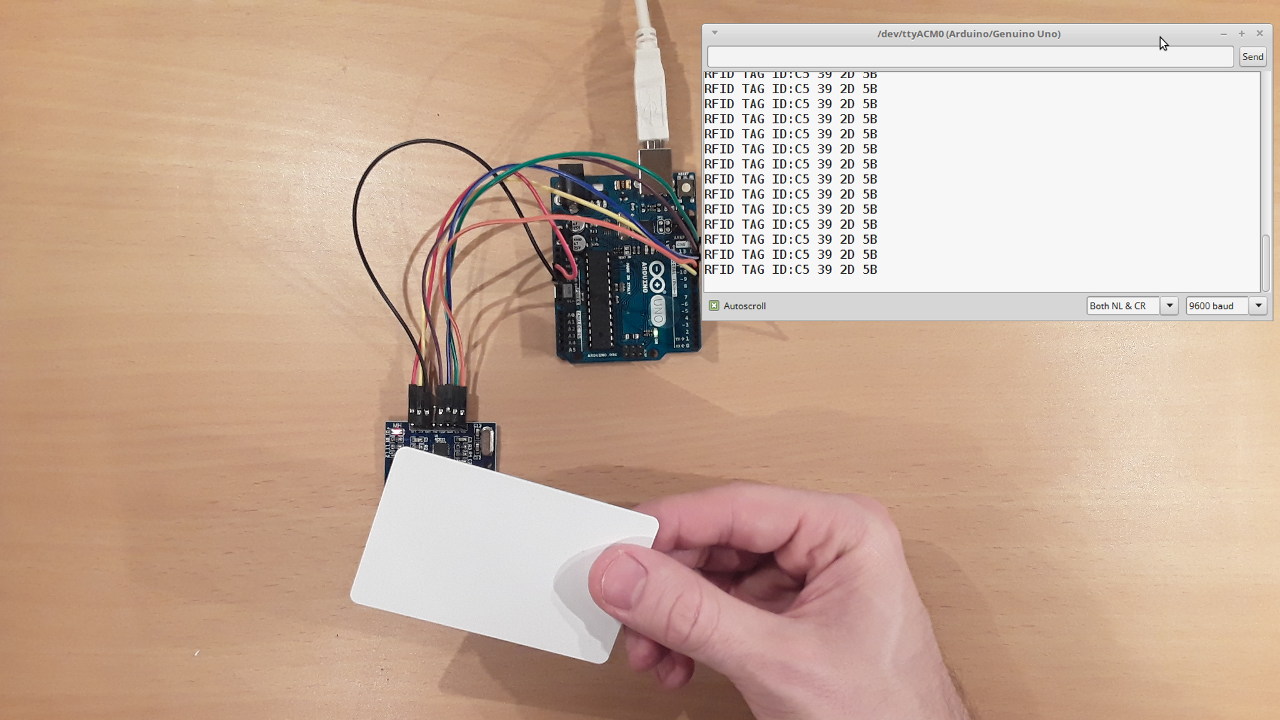
To check if an RFID tag is working, use an RFID reader or scanner to see if it returns a valid response or confirmation signal within the expected read range. However, a tag that passes this test may still fail if it is passive and lacks a nearby reader’s signal to power its response, so always verify consistent performance at the intended distance.
Definition of RFID Tag
A Radio Frequency Identification (RFID) tag is a small electronic device that contains a microchip and an antenna. It uses radio waves to transmit and receive data wirelessly. The RFID tag is affixed to an object or embedded into a product, allowing for automatic identification and tracking.
Related travel guides: How To Check RFID Balance Online, 8 Best Baggallini RFID Bags For 2024, and RFID Technology Basics.
The RFID tag consists of two main components: the microchip and the antenna. The microchip contains a unique identifier and can store additional data such as product information or security codes. The antenna is responsible for transmitting and receiving radio waves for communication with RFID readers or scanners.
RFID tags can be classified into two types: passive and active. Passive RFID tags do not have an internal power source and rely on the energy harvested from the RFID reader's signals to power their operations. They are usually smaller, less expensive, and have a shorter read range. Active RFID tags, on the other hand, have an internal power source, such as a battery, which enables them to actively transmit data over longer distances. Active RFID tags are typically larger, more expensive, and have a longer read range.
RFID technology offers several advantages over traditional barcode systems. Unlike barcodes, which require line-of-sight scanning, RFID tags can be read from a distance and even through non-metallic materials. This enables faster and more efficient inventory management, asset tracking, and supply chain logistics. RFID tags also provide better data accuracy, as they can be read in bulk rather than one at a time like barcodes.
Today, RFID technology is used in various industries, including retail, healthcare, manufacturing, transportation, and logistics. It enables businesses to streamline operations, reduce costs, and improve overall efficiency.
Importance of Checking RFID Tag
Checking the functionality of RFID tags is essential to ensure accurate and reliable data collection and operation. Here are several reasons why it is important to regularly check RFID tags:
- Data Accuracy: RFID tags are used for tracking and identification. If a tag is not functioning properly, it can lead to inaccurate data collection, which can have significant consequences. For example, in inventory management, an invalid or malfunctioning RFID tag could result in incorrect stock levels, leading to stockouts or overstock situations.
- Operational Efficiency: Functional RFID tags streamline operations by automating processes such as asset tracking, supply chain management, and access control. When RFID tags are not working, these processes may be disrupted, leading to delays, errors, and inefficiencies.
- Security: RFID tags are often used for access control in environments such as secure facilities, airports, and hospitals. If an RFID tag is not functioning properly, it can compromise security measures, potentially allowing unauthorized individuals to gain access to restricted areas.
- Cost Savings: Regularly checking RFID tags helps identify issues early on, allowing for timely repairs or replacements. This proactive approach can prevent costly downtime, minimize disruptions, and save money in the long run.
- Customer Satisfaction: In industries such as retail and e-commerce, RFID tags are used to improve inventory accuracy and ensure timely product availability. When RFID tags are functioning correctly, customers can trust that the items they want are in stock, resulting in a positive shopping experience.
By checking the functionality of RFID tags regularly, businesses can avoid potential problems, maintain data accuracy, optimize operations, enhance security, and provide a better overall experience for customers. When testing a tag, the RFID reader may display or transmit the tag's unique identifier or other stored data, or provide a confirmation signal such as a beep. Similarly, the scanner may display the tag's information on its screen, through a connected device, or provide another confirmation signal such as a beep. To verify performance, use the RFID reader to check whether the tag returns a valid response consistently within the expected read range.
Methods to Check RFID Tag
There are various methods available to check the functionality of RFID tags. These methods help ensure that the tags are working correctly and provide accurate data. Here are some common methods to check RFID tags:
- Visual Inspection: The first and simplest method is a visual inspection of the RFID tag. Check for any physical damage, such as cracks, bent antennas, or detached components. Ensure that the tag is firmly attached to the object, especially if it is adhesive-backed. If any visible damage or misplacement is detected, replace or reposition the tag accordingly.
- Checking with RFID Reader: Another method to check RFID tags is to use an RFID reader. Place the tag within the read range of the reader and check if it is detected. If the tag is undetectable, it may indicate a problem with the tag, reader, or communication between them.
- Testing with RFID Scanner: RFID scanners are handheld devices used to read and identify RFID tags. By scanning the tag with an RFID scanner, you can verify if it is functioning properly. Testing with an RFID scanner allows you to quickly identify any malfunctioning tags.
- Verifying Read Range and Orientation: The performance of an RFID tag can depend on its read range and orientation. Use an RFID reader or scanner to check whether the tag returns a valid response consistently within the expected read range. Move the tag closer to or farther from the reader to observe if the response changes. A lack of response within the expected range may indicate tag malfunction, weak antenna, or interference issues that need to be addressed.
These methods can be used individually or in combination, depending on the specific requirements and circumstances. Regularly checking RFID tags using these methods ensures that they are working properly and provides peace of mind in terms of accurate data collection and efficient operations.
Visual Inspection
Visual inspection is a simple yet essential method to check the functionality of RFID tags. By visually examining the tags, you can identify any physical damage or issues that may affect their performance. Here are some steps to conduct a visual inspection of RFID tags:
- Check for Physical Damage: Inspect the RFID tags for any signs of physical damage, such as cracks, dents, or bent antennas. Damage to the tag can impact its ability to transmit and receive radio waves, resulting in poor performance or complete failure.
- Ensure Firm Attachment: Verify that the RFID tags are securely attached to the objects they are affixed to, especially if they are adhesive-backed. Loose tags may cause inconsistent readings or complete loss of signal. If a tag is loose, reposition or reattach it properly.
- Examine Antenna: Take a closer look at the tag's antenna. Ensure that it is intact and not damaged. The antenna is a critical component for transmitting and receiving radio waves, and any damage to it can severely affect the tag's performance.
- Check for Wear and Tear: Over time, RFID tags may experience wear and tear due to environmental factors or regular use. Look for signs of wear, such as fading or peeling. If the tag's appearance deteriorates, it is recommended to replace it with a new one to maintain optimal performance.
During the visual inspection, make sure to follow any specific guidelines provided by the manufacturer. Some RFID tags may have additional features or indicators that can be examined visually, such as LED lights or tamper-evident features.
By conducting regular visual inspections of RFID tags, you can identify any physical damage or issues early on. Addressing these issues promptly will help ensure that the tags are functioning correctly and prevent potential problems that may arise during tracking, identification, or data collection processes.
Checking with RFID Reader
One effective method to check the functionality of RFID tags is by using an RFID reader. An RFID reader is a device that sends and receives radio frequency signals to communicate with RFID tags. Here is a step-by-step process for checking RFID tags using an RFID reader:
- Power on the RFID Reader: Ensure that the RFID reader is properly powered on and ready for operation. Connect it to a power source or make sure the batteries are fully charged.
- Position the RFID Tag: Place the RFID tag within the read range of the RFID reader. The read range varies depending on the specific reader and tag, so consult the manufacturer's guidelines for optimal positioning.
- Perform the Reading: Activate the RFID reader to scan for nearby tags. The reader will emit radio frequency signals to communicate with the tags within its range. Once the reader detects a tag, it may display or transmit the tag's unique identifier or other stored data, or provide a confirmation signal such as a beep.
- Check for Successful Reading: Confirm that the RFID reader successfully reads the RFID tag's information. A successful response might be the unique identifier, stored data, a beep, a screen confirmation, or another reader output signal. If the reader successfully reads the tag's data, it indicates that the tag is functioning properly. However, if the tag is not detected or the data cannot be read, it may suggest a problem with the tag, reader, or the communication between them.
- Repeat for Multiple Tags: If you are checking multiple RFID tags, repeat the process for each tag individually. This will help identify any tags that are not properly detected or are malfunctioning.
It is important to note that different RFID readers and tags may have varying compatibilities and specifications. Ensure that the RFID reader you are using is compatible with the specific tag technology being used.
By utilizing an RFID reader to check RFID tags, you can quickly and accurately determine if the tags are working as intended. This method allows for efficient identification and troubleshooting of any malfunctioning or undetected tags, improving overall operational efficiency and data accuracy.
Testing with RFID Scanner
Another effective method to check the functionality of RFID tags is by using an RFID scanner. An RFID scanner is a handheld device that can read and identify RFID tags. It offers a portable and convenient way to test the performance of RFID tags. Here is a step-by-step process for testing RFID tags using an RFID scanner:
- Charge the batteries or connect it to a power source to ensure sufficient power.
- Position the RFID Tag: Hold the RFID scanner in close proximity to the RFID tag being tested. The scanner should be within the read range specified by the manufacturer of the scanner and tag.
- Scan the RFID Tag: Activate the scanning function on the RFID scanner. Place the scanner's antenna near or directly on the RFID tag to initiate the scanning process. The scanner will emit radio frequency signals to communicate with the tag and retrieve its unique identifier or any additional information stored on the tag.
- Check the Scanned Information: Verify that the RFID scanner successfully reads the information from the RFID tag. If the scanned information is displayed correctly, it indicates that the RFID tag is functioning properly. However, if no information is detected or the data appears incorrect, it may suggest an issue with the tag's functionality.
- Repeat for Multiple Tags: If you are testing multiple RFID tags, repeat the scanning process for each tag one by one. This allows you to identify any tags that are not being properly scanned or are malfunctioning.
Using an RFID scanner provides a portable and efficient way to test the functionality of RFID tags. It allows you to quickly determine if the tags are working correctly and retrieve the necessary information. This method is especially useful when dealing with a large number of tags or when conducting on-the-go testing in various locations.
Remember to follow the manufacturer's guidelines and recommendations when using specific RFID scanner models to ensure accurate testing and reliable results.
Verifying Signal Strength
Verifying the signal strength of RFID tags is an important method to check their functionality. The signal strength can indicate the quality of the communication between the RFID reader and the tag. Here's a step-by-step process for verifying the signal strength of RFID tags:
- Position the RFID Tag: Place the RFID tag within the read range of the RFID reader, ensuring that it's in an optimal position for communication. The read range can vary depending on the specific reader and tag, so refer to the manufacturer's guidelines for the recommended distance.
- A successful response may include the tag's unique identifier, other stored data, a beep, a screen confirmation, or another reader output signal.
- Move the Tag Closer or Farther: Gradually move the RFID tag closer to or farther away from the RFID reader while observing whether the tag continues to respond correctly. Note any significant fluctuations or drops in the response as you adjust the distance.
- Assess the Response Consistency: Evaluate the responses obtained during the movement of the RFID tag. Ideally, a strong and consistent response within the expected read range indicates proper functionality, while weak or intermittent responses may suggest issues such as tag malfunction, poor antenna quality, or interference in the environment.
- Record and Compare the Results: Keep a record of the response results for each RFID tag. Compare the readings to establish a baseline and identify any tags with consistently weak signals or significant variations in response.
Verifying the signal strength of RFID tags helps in identifying potential problems and optimizing their performance. If you encounter weak or inconsistent responses, you may need to address issues such as tag replacement, adjusting the reader's position, using repeaters or amplifiers, or resolving environmental interference.
It's important to note that different RFID readers and tags may have varying sensitivities and output methods. Consult the manufacturer's specifications and guidelines to interpret the responses accurately.
By actively verifying and monitoring the response of RFID tags, you can ensure robust and reliable communication between the tags and the readers, leading to accurate data collection and improved operational efficiency.
Troubleshooting RFID Tag Issues
Despite their reliability, RFID tags may encounter issues that affect their functionality. Troubleshooting RFID tag issues is crucial to identify and resolve any problems that may arise. Here are some common troubleshooting steps to address RFID tag issues:
- Ensure Proper Placement: Verify that the RFID tag is correctly positioned according to the manufacturer's guidelines. Incorrect placement can lead to weak signal strength or improper detection. Reposition the tag if necessary and test for improved performance.
- Check for Interference: Environmental factors, such as metallic objects, electromagnetic interference, or nearby electronic devices, can disrupt RFID communication. Remove any potential sources of interference and test the tag's functionality in a clear environment.
- Inspect Wiring and Connections: If the RFID tags are wired or connected to external devices, check for loose or damaged connections. Ensure that all wiring is intact and properly connected, as faulty connections can hinder proper tag functionality.
- Replace Dead or Weak Batteries: If you are using active RFID tags with internal batteries, check the battery levels or replace them if they are dead or weak. Low battery power can cause communication issues and affect the performance of active tags.
- Upgrade Firmware or Software: In some cases, RFID tags may require firmware updates or software patches to address bugs or improve functionality. Consult the tag manufacturer's documentation for any available updates and follow the provided instructions to ensure optimal performance.
- Test with Different Readers or Scanners: If you suspect a problem with the RFID reader or scanner, try testing the tag with a different reader or scanner. This helps isolate the issue and determine whether it lies with the tag or the reader/scanner.
If the troubleshooting steps above do not resolve the RFID tag issue, consider contacting the tag manufacturer's technical support for assistance. They can provide further guidance and troubleshooting specific to their product.
Regular maintenance and monitoring of RFID tags can help prevent issues from arising. Additionally, it is important to keep a record of any troubleshooting steps taken, as well as the outcomes, to aid in future problem-solving efforts.
By following these troubleshooting steps and promptly addressing any issues that arise, you can ensure smooth and reliable operation of RFID tags, minimizing disruptions and maintaining accurate data collection.
Common Problems and Solutions
While RFID technology is generally reliable, some common problems can occur with RFID tags. Understanding these issues and their solutions can help you troubleshoot and resolve them quickly. Here are the most frequent problems and how to fix them:
- Tag Not Detected: A tag may not be detected due to a weak signal, misalignment, or interference. To resolve this, ensure proper tag placement, adjust the reader’s position, and remove any sources of interference. The RFID reader may display or transmit the tag's unique identifier or other stored data, or provide a confirmation signal such as a beep—so if you get no response at all, check these factors first.
- Interference: Other electronic devices, metal objects, or environmental factors can disrupt RFID communication. Remove or relocate potential interference sources, or use shielding to protect tags from external disruption.
- Read Range Issues: A limited read range can stem from weak signal strength, low battery power in active tags, or obstacles blocking the signal. Optimize the tag-reader distance, ensure adequate power for active tags, and remove any obstructing objects.
- Data Integrity: Inaccurate or corrupted data can occur when tags experience interference or errors during transmission. Implement error-checking mechanisms, use redundancy in data storage, or adopt encryption measures to ensure data integrity and minimize errors. The scanner may display the tag's information on its screen, through a connected device, or provide another confirmation signal such as a beep—so verify what output you’re expecting.
- Tag Collision: When multiple tags respond at once, they can cause interference and unreadable data. Anti-collision protocols, such as the Electronic Product Code (EPC) Gen2, mitigate this by allowing simultaneous reading of multiple tags through backscatter modulation techniques.
- Environmental Factors: Extreme temperatures, moisture, chemicals, or physical stress can affect tag performance and durability. Select tags suited for the intended environment and ensure compatibility with the conditions they’ll face.
To address these issues, follow best practices: implement proper tag placement, use appropriate tag-reader configurations, conduct regular maintenance, and ensure tag-environment compatibility. If problems persist or you’re struggling to diagnose them, consult RFID experts or contact the tag manufacturer’s technical support for assistance.
By understanding these common problems and their solutions, you can keep RFID tags functioning smoothly and maintain operational efficiency and data accuracy.
Conclusion
Successfully checking the functionality of RFID tags is crucial for businesses and organizations to ensure accurate data collection, efficient operations, and enhanced security. By employing methods such as visual inspection, using RFID readers or scanners, and troubleshooting common issues, you can maintain the optimal performance of RFID tags.
Visual inspection allows for the identification of any physical damage or misplacement of RFID tags. Checking with RFID readers and scanners enables the detection of tags and the retrieval of their unique identifiers or additional information.
Regularly checking RFID tags and addressing any issues promptly ensures data accuracy, operational efficiency, cost savings, and customer satisfaction. Remember to consult the manufacturer's guidelines and seek technical support when necessary to ensure proper functionality and performance.
