

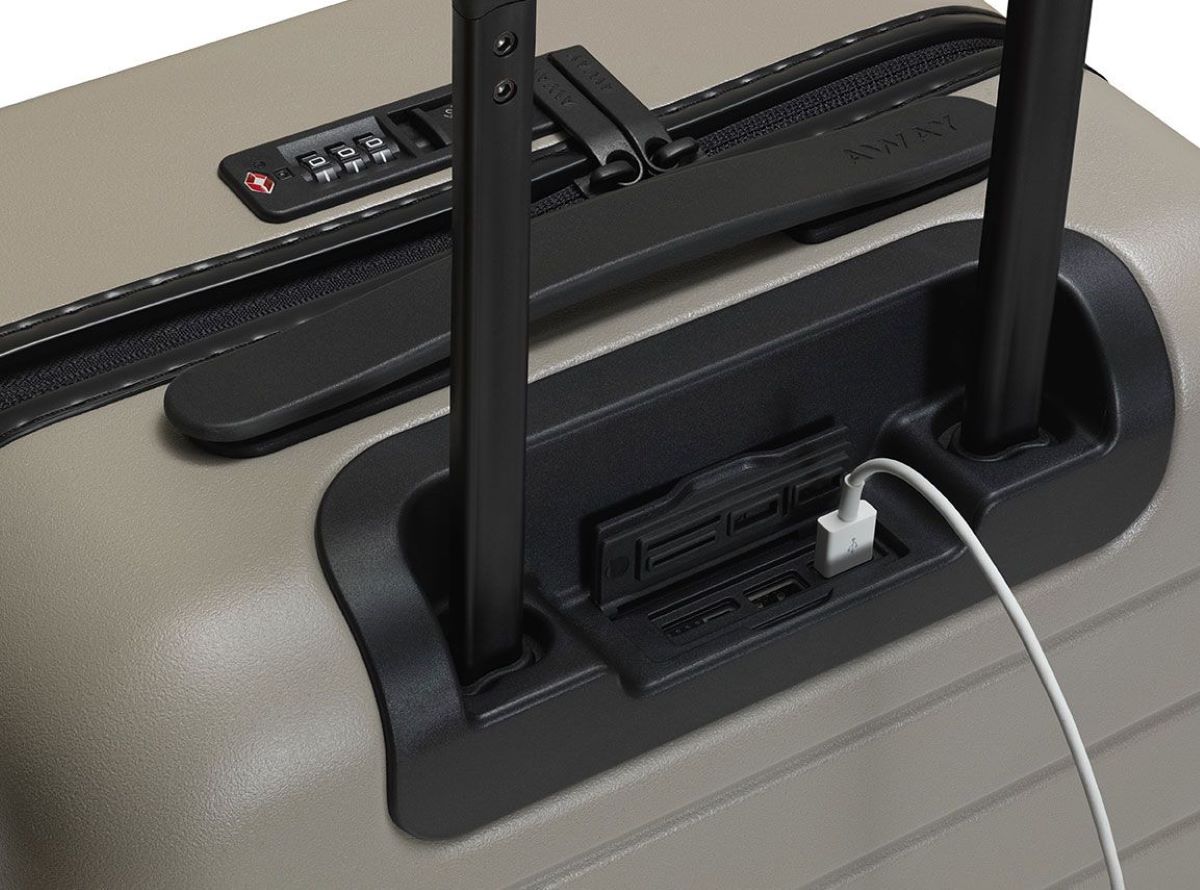
A USB port on a suitcase works as a pass-through port, acting as a cable extension between your power bank and your device. The suitcase itself does not generate power, so you must provide your own power bank to connect to the internal cable.
Overview of USB Ports
USB, which stands for Universal Serial Bus, is a widely adopted standard for connecting electronic devices to a host device, such as a computer or a wall outlet. USB ports have become ubiquitous in our daily lives, found on computers, smartphones, tablets, and various other devices. They provide a convenient and standardized way to transfer data and charge devices.
USB ports come in different versions, with USB 2.0 and USB 3.0 being the most common. USB 2.0 provides data transfer speeds of up to 480 Mbps, while USB 3.0 offers the much faster speed of up to 5 Gbps. The latest version, USB 3.1, boasts even higher speeds of up to 10 Gbps.
USB ports are designed to be versatile, allowing for the connection of various peripherals and accessories, such as keyboards, mice, printers, and external storage devices. They have become an essential feature in both personal and professional settings, enabling easy and efficient data transfer and device charging.
In recent years, the integration of USB ports in travel essentials has gained popularity, catering to the needs of tech-savvy travelers who rely heavily on their electronic devices. USB ports on suitcases, in particular, have become a game-changer, providing a convenient charging solution while on the move.
With USB ports on their suitcases, travelers no longer need to juggle multiple chargers or hunt for available outlets. They can simply connect their devices directly to the USB port on their suitcase and power them up hassle-free. This feature offers convenience, efficiency, and peace of mind, ensuring that our devices are always ready for use, even during long layovers or when electrical outlets are scarce.
Some suitcases may include a built-in power bank, which serves as the power source for the USB port, though most rely on a separate power bank you provide. When a power bank is connected to the suitcase's internal cable, the USB port on the suitcase passes the electrical power through to the connected devices. This setup works as a simple cable extension between your power bank and your device.
Now that we have a basic understanding of USB ports and their widespread use, let's dive deeper into the world of USB ports on suitcases and explore their purpose and functionality.
USB Port on a Suitcase: Purpose and Functionality
The USB port on a suitcase serves the primary purpose of providing a convenient and accessible power source for charging electronic devices while traveling. It eliminates the need to carry multiple chargers or rely on finding available electrical outlets in unfamiliar environments.
By integrating a USB port into the design of a suitcase, manufacturers have revolutionized the way we stay connected on the go. Travelers can now easily charge their smartphones, tablets, e-readers, smartwatches, and other USB-powered devices directly from their suitcase.
The functionality of a USB port on a suitcase is quite straightforward. It acts as a pass-through port: you connect your own power bank to an internal cable inside the case, and the external port then passes that power along to your device via a standard USB charging cable. This effectively turns your suitcase into a portable charging station, which is especially beneficial during long flights, layovers, or road trips where access to power outlets may be limited.
Furthermore, USB ports on suitcases are designed to be compatible with a wide range of devices. Whether you have an iPhone, Android phone, iPad, or any other USB-powered device, you can rest assured that it will charge seamlessly when connected to a USB port on a suitcase.
This feature can be especially useful during outdoor adventures or situations where you need to charge your device on the go.
Overall, the purpose and functionality of a USB port on a suitcase are to provide a convenient and reliable power source for charging your electronic devices while traveling, ensuring you have a charging solution at your fingertips wherever your journey takes you.
Design and Placement of USB Ports on Suitcases
The design and placement of USB ports on suitcases play a crucial role in ensuring convenience and usability for travelers. Manufacturers take into consideration factors such as accessibility, durability, and aesthetics when incorporating USB ports into their suitcase designs.
USB ports on suitcases are typically located on the exterior, near the handle or on the side of the suitcase. This strategic placement allows for easy access and minimizes the risk of damage to the port or connected devices. Placing the USB port near the handle also ensures that it is within reach while the suitcase is in use.
In terms of design, USB ports on suitcases are often integrated seamlessly into the overall aesthetic of the suitcase. They are usually discreetly placed and blend in with the overall design elements of the suitcase. This ensures that the USB port does not compromise the visual appeal of the suitcase while still providing its functionality.
Durability is another crucial aspect of the design of USB ports on suitcases. They are designed to withstand the rigors of travel, including rough handling, temperature changes, and exposure to moisture. USB ports on suitcases are usually built with high-quality materials and have a sturdy construction to ensure longevity and reliability.
Some suitcases may also incorporate additional features to enhance the usability of the USB port. For example, some models have integrated retractable cords or cable management systems, allowing you to neatly store the charging cable when not in use. This feature prevents tangling and makes it easier to access the charging cable whenever needed.
Furthermore, manufacturers are increasingly considering the evolving needs of travelers by incorporating multiple USB ports into their suitcase designs. This allows travelers to charge multiple devices simultaneously, eliminating the need for additional charging hubs or adapters. Multiple USB ports cater to the needs of individuals who travel with multiple devices or those who want to charge their devices while also sharing the charging capability with fellow travelers.
This pass-through design means the suitcase acts as a cable extension between your power bank and your device, rather than generating power itself.
The design and placement of USB ports on suitcases are critical in ensuring a positive user experience. By taking into account accessibility, durability, and aesthetics, manufacturers are able to offer travelers a convenient and reliable way to charge their devices while on the go. The integration of additional features further enhances the usability and versatility of the USB ports, ensuring that travelers have a seamless charging experience throughout their journey.
Power Source for USB Ports on Suitcases
USB ports on suitcases require a power source to function and provide charging capabilities to connected devices. The power source can vary depending on the design and features of the suitcase, and understanding these power sources is essential for utilizing the USB port effectively.
Many suitcases with built-in USB ports rely on an external power source to charge devices. This means that the USB port on the suitcase serves as a conduit, allowing power to flow from a power bank to the connected devices.
These power banks are usually rechargeable and can provide multiple charges for your devices. This feature is particularly useful when you don't have access to a power outlet or when you're on the move.
It acts as a mediator, ensuring a safe and efficient transfer of power from the source to your devices.
It's important to note that the charging speed of the USB port on a suitcase may vary depending on the power source. USB 2.0 ports typically provide a lower charging speed compared to USB 3.0 or USB 3.1 ports. It's recommended to check the specifications of your suitcase's USB port to understand its charging capabilities.
Additionally, some suitcases come with smart charging technology built into the USB port. This technology intelligently detects and adjusts the power output based on the device's charging requirements. This can help optimize charging speed and prevent overcharging or overheating of devices.
In summary, USB ports on suitcases rely on a power source to provide charging capabilities to connected devices. This power source is typically a separate power bank you provide, though some models may include a built-in battery pack. Understanding the power source of your suitcase's USB port will enable you to effectively utilize its charging capabilities while on your travels.
Compatibility and Charging Speeds
When it comes to USB ports on suitcases, compatibility and charging speeds are essential factors to consider. Understanding the compatibility and charging capabilities of your suitcase's USB port ensures that your devices can be charged efficiently and effectively.
Compatibility is an integral aspect of USB ports on suitcases. Most USB ports on suitcases are designed to be universally compatible with various USB-powered devices, including smartphones, tablets, e-readers, smartwatches, and other electronic gadgets. Whether you have an iPhone, Android device, or any other USB-powered device, you can expect your suitcase's USB port to accommodate its charging needs.
It's important to note that the USB port should have the correct voltage and amperage output to charge your specific device properly. You may also need to use the USB charging cable that came with your device or a reputable third-party cable to ensure compatibility.
Charging speeds can vary depending on the USB version and the power output of the USB port. USB 2.0 ports generally provide a slower charging speed compared to USB 3.0 or USB 3.1 ports. However, it's crucial to check the specifications and capabilities of your suitcase's USB port to determine the optimal charging speed it can provide.
Some suitcases may feature USB ports with fast charging capabilities. Fast charging technology uses higher voltage outputs to recharge devices at a significantly faster rate. This feature can be especially beneficial when you're in a time crunch or need a quick charge before heading to your next destination.
It's worth noting that the charging speed can also be influenced by other factors, such as the charging capabilities of your device and the presence of any smart charging technology in the USB port. Smart charging technology can detect and adjust the power output based on your device's charging requirements, optimizing charging speed and efficiency.
When using a USB port on your suitcase to charge your devices, it's advisable to give yourself ample time for charging, especially if you're dealing with larger devices or devices with higher power requirements. In some cases, charging speeds may be slower than using a dedicated wall charger, so planning accordingly can help ensure your devices are charged when you need them.
In summary, USB ports on suitcases offer compatibility with a wide range of USB-powered devices. It's important to make sure your device's charging cable is compatible with the USB port and to consider the charging speeds provided by the USB port. Understanding compatibility and charging speeds allows you to maximize the effectiveness of your suitcase's USB port and ensure your devices are charged efficiently while on the go.
Security Considerations for USB Ports on Suitcases
While USB ports on suitcases offer convenience and ease of use, it's important to be aware of potential security considerations when utilizing these ports. Understanding the risks and taking necessary precautions can help protect your devices and personal information while charging on the go.
One primary security concern is the possibility of data theft or malware transmission through USB connections. Hackers may attempt to exploit USB ports to gain unauthorized access to connected devices or to install malicious software without your knowledge. This risk is particularly relevant when using public USB ports, such as those found in airports or hotels.
To mitigate this risk, it's recommended to use a USB data blocker or a charge-only USB cable. USB data blockers, also known as USB condoms or USB blockers, allow power to pass through to your device while blocking the data lines. This ensures that only power is transmitted, preventing any unauthorized data transfer or malware installation.
Another security consideration is the potential for physical tampering with the USB port. Public USB ports can be manipulated to capture sensitive information or infect devices with malicious software. It's crucial to visually inspect the USB port for any signs of tampering, such as loose connections or unusual additions.
If you suspect any tampering or feel unsure about the integrity of a USB port, it's best to avoid using it and seek a trusted and secure alternative, such as using a wall charger or a portable power bank.
Furthermore, it's important to keep your electronic devices secure while connected to a USB port on a suitcase. Be mindful of your surroundings and avoid leaving your devices unattended. Exercise caution when using public USB ports, and consider using a privacy screen or shield to protect against shoulder surfing or visual hacking attempts.
Additionally, protecting your devices with up-to-date security measures, such as strong passwords, device encryption, and regular software updates, can help safeguard your personal information and mitigate potential risks during USB charging.
Lastly, it's advisable to research and choose suitcases from reputable manufacturers that prioritize security in their designs. Look for brands that implement security features, such as built-in surge protection or smart charging technology.
By being aware of the security considerations associated with USB ports on suitcases and taking necessary precautions, you can enjoy the convenience of charging your devices on the go while keeping your personal information and devices protected.
Common Issues and Troubleshooting for USB Ports on Suitcases
While USB ports on suitcases provide convenient charging solutions, they can sometimes encounter common issues. Being aware of these issues and knowing how to troubleshoot them can help you overcome any challenges and ensure uninterrupted device charging during your travels.
One common issue is a USB port not providing any power or charging capability. If you encounter this problem, first check if the USB port is securely connected to a power source. Ensure that the power source is functioning correctly by testing it with other devices or chargers. If the power source is working properly, try using a different USB cable or connecting a different device to rule out any cable or device-related issues.
Another common issue is slow charging or intermittent charging. If you notice that your devices are charging slowly or the charging connection keeps getting disrupted, check if the USB port is clean and free from debris or dust. Use a small brush or compressed air to remove any dirt or obstructions that may be interfering with the connection.
If slow charging persists, it could be due to a low-power output from the USB port. Check the specifications of the USB port to ensure it provides sufficient power for your device. Some devices, such as tablets or laptops, may require more power than what a standard USB port can deliver. In this case, consider using a dedicated wall charger to ensure faster and more efficient charging.
If you encounter compatibility issues, where your device is not charging or recognized when connected to the USB port, double-check that your device and charging cable are compatible with the USB port. Ensure that the charging cable is not damaged and try using a different cable or device to isolate the issue.
If you're using a suitcase with a built-in power bank, but find that it's not charging or not holding a charge, check if the power bank has sufficient charge remaining. If the power bank is depleted, connect it to a power source and allow it to recharge fully. If the issue persists, contact the manufacturer for further assistance or potential warranty support.
In some cases, resetting the USB port or updating the firmware of the suitcase may help resolve connectivity or charging issues. Refer to the manufacturer's instructions or support resources to learn how to reset or update the USB port on your specific suitcase model.
If you're still experiencing issues with the USB port on your suitcase, it's recommended to contact the manufacturer's customer support for further troubleshooting guidance or potential warranty support. They can provide specific advice based on your suitcase model and help you resolve any persistent issues.
By being aware of these common issues and troubleshooting steps, you can overcome any challenges with USB ports on suitcases and ensure optimal charging performance for your devices while on the go.
Recent Innovations and Future Developments
The world of USB ports on suitcases has continued to evolve with recent innovations and exciting advancements. As technology progresses, manufacturers are constantly finding new ways to enhance the functionality and convenience of these ports, offering travelers even more seamless charging experiences.
One recent innovation is the integration of USB Type-C ports on suitcases. USB Type-C is a versatile and reversible connector that allows for faster data transfer and higher power delivery. With USB Type-C ports, travelers can enjoy faster charging speeds and increased compatibility with a wider range of devices.
Another exciting development is the incorporation of wireless charging technology into suitcases. Some manufacturers have introduced suitcases with built-in wireless charging pads or compartments, allowing users to simply place their wireless-charging-enabled devices on the suitcase, eliminating the need for cables altogether.
In addition to wireless charging, there have been advancements in fast-charging capabilities. Suitcases now feature USB ports that support fast charging technologies, such as Qualcomm Quick Charge or Power Delivery. These technologies enable devices to charge at unprecedented speeds, keeping travelers connected and powered up in no time.
The concept of smart suitcases has also emerged in recent years. These suitcases often come equipped with USB ports that have smart charging capabilities. They can detect and optimize the charging process based on the connected devices' power requirements, ensuring efficient and safe charging.
Furthermore, some manufacturers are exploring the integration of solar panels into suitcases, transforming them into self-sustaining power sources. These solar-powered suitcases harness the energy of the sun, allowing travelers to recharge their devices using clean and renewable energy while on the move.
In terms of future developments, we can expect continued advancements in charging technology, increased compatibility with newer devices, and even more seamless integration of USB ports into suitcase designs. With the growth of wearable technology and the Internet of Things (IoT), there may be innovations that cater specifically to the charging needs of these emerging devices.
Additionally, the focus on sustainability and eco-friendliness may lead to the development of more energy-efficient USB ports and suitcase charging systems. We may see advancements in energy storage capabilities, allowing suitcases to store and deliver power more efficiently, reducing overall energy consumption.
As technology continues to evolve, USB ports on suitcases will likely adapt to meet the changing needs of travelers. Whether it's faster charging speeds, increased compatibility, or environmentally friendly solutions, the future of USB ports on suitcases is sure to bring even greater convenience and efficiency to our travel experiences.
Conclusion
USB ports on suitcases have changed how we charge devices while traveling, offering convenience without the need to hunt for outlets. However, it’s important to understand how they actually work: the port is usually a pass-through connection, meaning the suitcase itself does not generate power.
This design essentially makes the suitcase a cable extension between your power bank and your phone or tablet, keeping your gadgets charged without needing to hold the battery pack directly.
We’ve covered the functionality, compatibility, and charging speeds of these ports, plus security considerations and troubleshooting tips. Recent innovations like USB Type-C and smart charging have improved the experience, and future developments may bring more sustainable options. Whether you’re a frequent flyer or an occasional traveler, understanding this pass-through system helps you pack smarter and stay powered during your trips.
Related travel guides: How To Decorate A Suitcase, What Is The Zipper Inside A Suitcase For, and Which Side Of Suitcase Is For Clothes.
