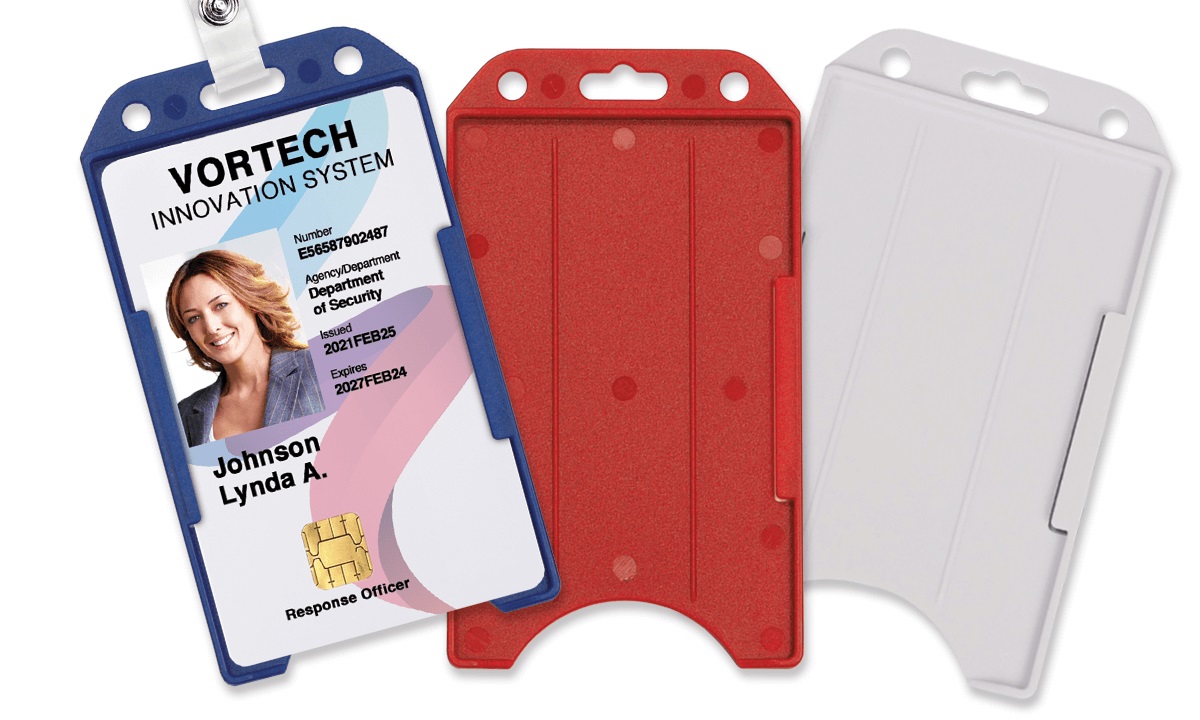
To open an ID card holder, you slide the card into its slot, press a button, or snap open a closure depending on the type you have. The specific method matters because holders vary widely—from badge holders with a slot and button closure to retractable badge reels and card sleeves—so identifying your holder type first prevents damage to the card or holder. Gather your ID card holder, your ID card, a clean flat surface, and good lighting to ensure a smooth process.
Step 1: Gather necessary materials
Before you begin opening your ID card holder, gather the necessary materials to ensure a smooth process. The materials you'll need may vary depending on the type of ID card holder you have, but here are some common items you may need:
- ID card holder: This includes badge holders, card sleeves, retractable badge reels, or any other type of holder you may have.
- Your ID card or badge: Make sure you have the card you want to insert or remove from the holder.
- A clean and flat surface: It's always a good idea to work on a clean and stable surface to prevent accidentally dropping or damaging your ID card.
- Good lighting: Adequate lighting will help you see the opening mechanism clearly and ensure that you handle your ID card with care.
By gathering these materials beforehand, you can ensure a hassle-free experience while opening your ID card holder. It's also a good practice to keep your ID card holder and your ID card in a safe place when not in use to avoid misplacing them.
Step 2: Identify the type of ID card holder
Before you start opening your ID card holder, identify the type of holder you have. Different holders have varying opening mechanisms. Here are common types:
- Badge holders with a slot: These have a vertical or horizontal slot on one side where you slide in your ID card. This type is used for ID badges, access cards, or any card that needs to be displayed.
- Some holders may have a button or snap closure mechanism that keeps the ID card secure. These holders are often used for cards that need a higher level of protection.
- Retractable badge reels: These have a retractable cord or reel that lets you extend the ID card for scanning or displaying and then retract it back into the holder.
- Card sleeves: Transparent sleeves designed to hold the ID card. They come in various sizes and can be fitted with a lanyard or attached to a retractable badge reel.
By identifying your specific ID card holder type, you can proceed to the appropriate steps for opening it. This ensures you handle the holder correctly without damaging your ID card or the holder.
Step 3: Determine the opening mechanism
Once you have identified the type of ID card holder you have, the next step is to determine the specific opening mechanism it uses. Different holders have different methods of opening. Here are a few common opening mechanisms:
- Sliding mechanism: Some ID card holders have a sliding mechanism where you simply need to slide the card in and out of the holder's slot. This is common in badge holders with a slot on one side.
- Some holders may have a button or snap closure mechanism that keeps the ID card secure. If your ID card holder has a button or snap closure, you may need to press a button or snap open the closure to access the card inside.
- Retractable cord: For retractable badge reels, the opening mechanism typically involves pulling the cord or reel to extend the ID card. To retract it back into the holder, you may need to release a button or give the cord a gentle tug.
- Lanyard or attachment removal: If your ID card holder is attached to a lanyard or other fastening method, you may need to detach or unclip the holder to access the ID card.
By determining the specific opening mechanism of your ID card holder, you'll have a clearer idea of how to proceed in the next steps. This understanding will help you handle the holder correctly and avoid any potential mishaps or difficulties. Let's move on to the next step, where we delve into locating the opening slot or button.
Step 4: Locate the opening slot or button
Now that you know the type and opening mechanism of your ID card holder, it's time to locate the specific opening slot or button. This step will vary depending on the design of your particular holder, so pay close attention to ensure you can access your ID card easily. Here's what to look for:
- Badge holders with a slot: In these holders, the opening slot is usually located on one side of the holder. It may be at the top, bottom, or side, depending on the orientation of the slot. Look for a narrow opening where you can slide your ID card in and out.
- Badge holders with a button closure: For badge holders with a button closure, hold the holder so the opening button or snap is accessible. If your ID card holder has a button or snap closure, you may need to press a button or snap open the closure to access the card inside. For badge holders with a button closure, hold the holder open and gently insert the ID card. Once inside, close the holder to secure the card. For badge holders with a slot, make sure the card is properly aligned within the holder. Align the edges of the holder and close it securely. Ensure that the holder is secure and holds the ID card firmly in place.
- Retractable badge reels: The opening mechanism for retractable badge reels can vary. Look for a small button, lever, or slider on the reel or handle of the holder. Pressing or sliding this mechanism will release the cord and allow you to extend the ID card.
- Card sleeves: Card sleeves are usually open on one or two sides, making it easy to insert or remove the ID card. Look for the open edges or a clear window where the card can be seen.
Take a close look at your ID card holder to locate the opening slot or button. Once you find it, you're ready to move on to the next step and learn how to handle the holder and access your ID card. Let's explore that in the next step.
Step 5: Align the ID card holder properly
Once you have located the opening slot of your ID card holder, it's time to align the holder properly for easy access to your ID card. Proper alignment ensures that you can smoothly slide or press the card into the holder without any difficulty. Here's how to do it:
- If you have a badge holder with a slot, hold the holder with the opening slot facing upwards. Make sure the slot is wide enough to accommodate your ID card.
- For badge holders with a button closure, hold the holder so the opening button or snap is accessible.
- If you are working with a retractable badge reel, hold the holder with the cord or reel facing downwards. Ensure that the cord is not tangled and is in a relaxed position to prevent any issues with extending or retracting it later on.
- In the case of card sleeves, hold the sleeve with the open side facing upwards. Verify that the sleeve is properly sized to fit your ID card.
Aligning your ID card holder properly ensures that you can easily insert or remove your ID card without any unnecessary force or misalignment. This step sets the stage for a smooth and seamless process, preventing any potential damage to your ID card or the holder. With the holder properly aligned, let's move on to the next step and learn how to slide or press open the ID card holder.
Step 6: Slide or press to open the ID card holder
Now that you have aligned your ID card holder properly, it's time to slide or press open the holder to access your ID card. This step will depend on the specific opening mechanism of your holder. Let's explore the process for the different types of holders:
- Badge holders with a slot: Hold the ID card firmly and insert it into the opening slot, sliding it in smoothly until it is fully inside the holder. To remove the card, gently slide it back out of the slot.
- Badge holders with a button closure: If your ID card holder has a button or snap closure, you may need to press a button or snap open the closure to access the card inside. For badge holders with a button closure, hold the holder open and gently insert the ID card. Once inside, close the holder to secure the card. For badge holders with a slot, make sure the card is properly aligned within the holder. Align the edges of the holder and close it securely. Ensure that the holder is secure and holds the ID card firmly in place.
- Retractable badge reels: Hold the ID card and extend the cord by pressing or sliding the designated mechanism. Allow the cord to fully extend for easy scanning or viewing of the card. To retract the cord, release the button or give a gentle tug, guiding the ID card back into the holder.
- Card sleeves: Open the card sleeve slightly wider by gently pulling apart the sides. Insert or remove the ID card from the opening, ensuring a snug fit. Release the sides of the sleeve to secure the card in place.
By following these steps, you can safely slide or press open your ID card holder to access your ID card. Pay attention to the movement and ensure that you handle your ID card with care to avoid any accidental damage. With your ID card easily accessible, let's move on to the next step and learn how to insert or remove the ID card from the holder.
Step 7: Insert or remove the ID card
With your ID card holder open, it's time to insert or remove your ID card. This step requires a delicate touch to prevent damage. Here's how:
- If you're inserting the ID card into a badge holder with a slot, carefully slide the card into the slot until it is fully inserted. Make sure the card is aligned properly and fits securely in the holder.
- For badge holders with a button closure, hold the holder open and gently insert the ID card. Ensure that the card is properly aligned and fits within the holder's dimensions. Once inside, close the holder to secure the card.
- If you're using a retractable badge reel, hold the ID card and guide it into the holder as you retract the cord. Ensure that the card is fully inside the holder before releasing the cord.
- In the case of card sleeves, insert the ID card into the open side of the sleeve. Slide it in until the card is fully inserted and fits snugly within the sleeve. Release the sides of the sleeve to secure the card in place.
When removing the ID card, reverse the process and handle the card with care. Gently slide or pull it out of the holder, ensuring that you don't bend or damage the card. Take your time to ensure a smooth insertion or removal.
Now that you know how to insert or remove your ID card from the holder, let's move on to the final step of closing the ID card holder securely.
Step 8: Close the ID card holder securely
After inserting or removing your ID card from the holder, close it securely to keep the card protected. The closing mechanism varies by holder type.
- For badge holders with a slot, make sure the card is properly aligned within the holder. Align the edges of the holder and close it securely. Ensure that the holder is secure and holds the ID card firmly in place.
- If you're using a retractable badge reel, release the cord gently and guide the ID card back into the holder. Ensure that the cord is fully retracted and the card is securely held within the holder.
- In the case of card sleeves, check that the card is snugly fit within the sleeve. Gently press the sides of the sleeve together to ensure a secure closure.
Closing the ID card holder securely prevents the card from slipping out or getting damaged. Inspect the closure and ensure it is properly fastened before storing or wearing the holder.
Congratulations! You have successfully learned how to open, insert, remove, and close your ID card holder. By following these steps, you can confidently manage your ID card holder, accessing your card when needed while ensuring its safety.
Remember to handle your ID card and holder with care, keeping them in a secure place when not in use. With this knowledge, you are now equipped to navigate any type of ID card holder.
Conclusion
In conclusion, opening an ID card holder doesn't have to be a daunting task. By following the step-by-step process outlined in this guide, you can easily unlock your ID card holder and access your cards.
We began by gathering the necessary materials and identifying the type of ID card holder we have. Understanding the opening mechanism and locating the opening slot set the stage for a smooth process. Properly aligning the holder ensured easy access, and sliding or pressing open the holder allowed us to insert or remove the ID card.
Handle the ID card with care during insertion or removal to avoid damage. Once the card is in place, closing the ID card holder securely is essential for protecting your card.
Remember to store your ID card holder in a safe place when not in use.
Related travel guides: How To Open An SD Card Holder, What Is A Good Card Holder, and How Much Is Goyard Card Holder?.